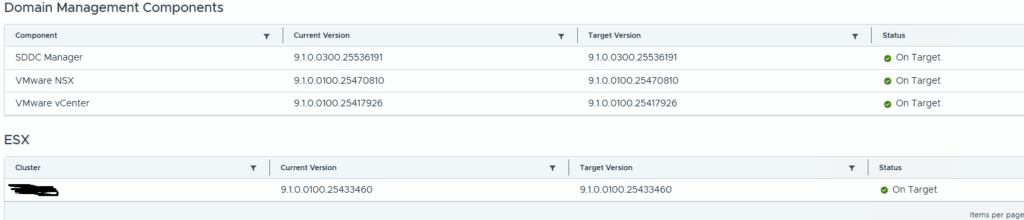
How to Fix “Version Drift” in VCF Operations After an SDDC Manager Upgrade
If you have recently upgraded your VMware Cloud Foundation (VCF) environment, you might notice a frustrating status under the Domain Management Components page in VCF Operations: Version Drift.
This status can stop future lifecycle operations in their tracks, but the fix is quick and requires zero downtime. Here is why it happens and how to resolve it using the built-in API Explorer.
The Symptom
After a successful SDDC Manager upgrade, navigating to VCF Operations shows a “Version Drift” status on one or more domains. Everything in the environment is running fine, but the user interface insists that the components are out of sync.
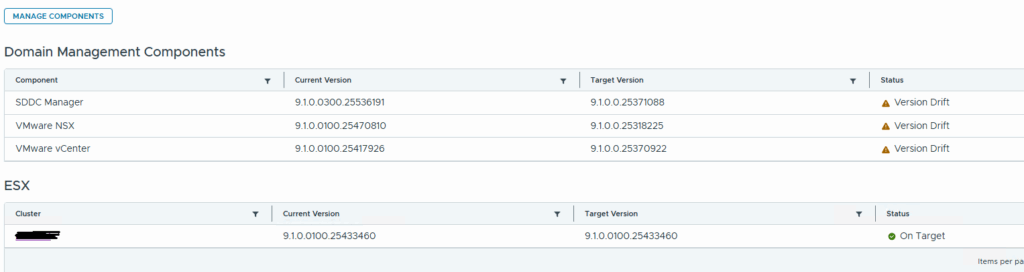
The Cause: Stale LCM Metadata
When you upgrade SDDC Manager, the Lifecycle Management (LCM) engine updates the active running versions. However, the system sometimes retains a cached Target Upgrade Version from the previous release cycle.
Because this old target version is now lower than your freshly upgraded, running version, VCF Operations misinterprets this as a configuration drift or an illegal downgrade state.
The Fix: Clearing Stale Metadata via API Explorer
To resolve this, you need to delete the stale target version record. The easiest way to do this is through the SDDC Manager API Explorer.
Step 1: Identify the Stale Domain Entry
- Log into your SDDC Manager user interface.
- Open the SDDC Manager API Explorer (Developer Center).
- Expand the TargetUpgradeVersion section.
- Click on the
GET /v1/releases/domainsendpoint and click Execute. - Scan the JSON response for the
DomainReleaseViewblocks. Look for any management/workload domain where thetargetSddcManagerVersionis lower than your current version. - Copy the domainId string for that specific domain.
Step 2: Delete the Stale Target Record
- Stay within the TargetUpgradeVersion section of the API Explorer.
- Locate and expand the
DELETE /v1/releases/domains/{domainId}endpoint. - Paste the
domainIdyou copied from Step 1 into the parameter field. - Click Execute.
The Result
The API call instantly wipes the stale target version record out of the database. When you navigate back to the Domain Management Components screen and refresh, the LCM engine will re-sync, clearing the false “Version Drift” error and returning your domains to a healthy, green status.